Tuesday, 15 February 2022

5 Important Considerations when Launching a New Corporate Website

Original Source: https://vuwall.com/5-important-considerations-when-launching-a-new-corporate-website/

If you’re here, it’s because you’re on our new website, launched on January 18 2020! This project took us less than 4 months and it was a complete 100% overhaul… and I’m not talking a team here: it was just me and 1 web guy… both part time.

I decided to write this blog to help others like me, launch a successful and effective website with the least amount of hurdles while minimizing costs. In my career, I’ve lived through the launch of 4 other corporate websites, all for tech companies, and so I’ve learned a few do’s and don’ts. This last experience was by far the fastest, the easiest, the cheapest, and definitely the most productive. If you’re a Marketing Director for a small to medium-size B2B tech company, with limited resources and a website that absolutely “has to go!”, have a read.

My 5 major website considerations:

  1. Hiring a web developer/designer consultant vs. a web agency.
  2. The best website builder platform. WIX or WordPress?
  3. Optimizing your SEO… climbing to the top!
  4. Generating more leads.
  5. Multilingual websites and their challenges.

1. A Web Guy or a Web Agency?

I’ve done both and I can tell you, that for us, a web guy (or girl) was definitely the way to go for 2 main reasons:

  1. Agencies tend to be a lot more expensive than independent developers
  2. Working with an agency takes a lot more time from start to launch

But the person you select, can’t just be anyone — it has to be the right one. Here’s what to look for in your web person:

  • Lots of experience in developing websites in the design platform that you plan to use – WordPress, in our case.
  • Must have both web development and graphic design abilities.
  • A solid portfolio with a style that you like.
  • A personality that you get along with and that you like… you will be working quite closely and the better the synergy between you, the better your site will be.
  • Experience in your industry is definitely an asset because understanding your business, your message, and your audience will make your web developer a better resource for you.
  • Someone who asks a lot of questions in order to understand your objectives and your goals and is able to take the initiative to propose best practices for the actual implementation of the site to meet your objectives. My guy actually challenges me (because I’m not a web expert) and most of the time, his way makes a lot more sense than my original proposition.

As a disclaimer, my experience with agencies has been limited and perhaps there are some that operate differently and are not so costly.

Why go with an independent web developer/designer:
  1. Less expensive! I got quotes that were 5 times and 1 that was even 10 times more expensive for the same website from an agency. Why? Because you have a team behind you. There’s a team of designers and developers, formal change requests, several iterations, a project manager, a lot of back and forth and every hour is billed… which brings be to the next reason:
  2. Quicker and more efficient! You can be sure that with an agency, you’re looking at at least doubling your delivery time. My developer and I met in person only twice. We worked together back and forth using Google Docs where I delivered all my content to him and he implemented it with 1 live working document. I trusted him to design as we go. He presented the core pages and initial design. We had some back and forth and once the theme was established, the rest of the site development flowed beautifully. With an agency, you will have a full wireframe design of your entire site in advance. Any changes you want to make along the way require change requests and more time and money. Every change request may take several days since there’s a team involved versus a few minutes. And of course, in 6 months, things will change anyway, because 6 months for a tech company is a lifetime!

2. What website builder platform to use? WordPress? WIX?

My answer: WordPress for any corporate website.

Today, it seems like everyone is on WordPress (about 30% of companies it turns out). It appears to be the best free, open-source platform that’s super flexible, relatively easy to use, has a great CMS, is SEO friendly, and offers great security features.

My journey to this conclusion: The first web developer I interviewed for the new site suggested WIX because of how easy it was to maintain. Something in my gut just didn’t trust the guy so I decided to do my own research. I spent hours and hours online reading, talking to everyone I knew and it was clear to me that WIX was not the right solution for us. We are a serious company that is growing quickly, with customers and employees all over the world, selling to Fortune 500 companies globally. WIX is a great platform for smaller local businesses or independent consultants or portfolios with just a few pages. Although it’s very easy to design, I could have probably done it myself, it cannot deliver the performance that WordPress can and is limited in design/functionality customization and plugins. For sites that are content heavy, have a lot of traffic, are focused on SEO, security, integration with 3rd party tools, etc. — WIX is definitely NOT the way to go.

I selected WordPress for 3 main reasons:

  • It has a really powerful website builder with a lot of great themes and plugins available to customize websites as much or as little as needed, making my design and user experience requirements virtually unlimited.
  • It has a really robust CMS (content management system) so that once the site is launched, I can easily add and edit content myself without having to rely on a website expert.
  • SEO: Apparently, WordPress is very SEO friendly right out of the box. This is why WordPress sites tend to rank higher than others in search engines.

There are tons of websites and blogs on this. Here are a few that I found useful:

3. Climb to the top of Google Search! With SEO, of course — but how?

Understanding how SEO works is key when you’re creating content and developing a new website. As the main content creator of our site, this is what I learned about SEO in my journey:

The SEO algorithm that Google uses has changed over the years. It is very complex and there are hundreds of factors, so there’s no cheating it. Your website has to be genuinely awesome from the way it’s built architecturally in the back end to having really good relevant content on the front end.

Here are the top 5 things we’ve been focussed on to improve our SEO.
  1. Content. Content is king! Your site will rank better with new fresh content. In addition to new content, existing content needs to be relevant and not too repetitive. Images need to have tags and metadata. Here’s how I plan to make that happen on our site:
    1. Blogs. To address this, I decided to create a blog section. To make this successful, I appointed a few brilliant people in the company to write just 1 blog per year. Also, I’m seeking out guest bloggers, customers and partners, to contribute to our blog section. For now, I’m committing to once a month with a goal of once a week… eventually!
    2. Press Releases. We distribute an average of 1-3 press releases every month! To help us with professional writers, editors and media distribution, we work with InGear Communications, a PR Agency.
    3. Case Studies. Anyone in charge of case studies knows this is the hardest one! Much of what we do happens in control rooms within military applications or government agencies and even within commercial business, it’s usually part of their security infrastructure and so it’s extremely difficult to get permission to publish a case study, but we do chase whoever we can and are very proud to tell the world about our projects when we can.
  2. Clean architecture. Our old website was also built on WordPress, but what a mess! There was so much custom-code, not even a web developer was able to figure it out. There was a consensus that would be easier to start from scratch with a nice clean architecture, that it would be faster, easier, cleaner and most important better for SEO.
  3. Mobile usability and fast loading time. This one is for our web developer. Let’s just call him Chris (because that’s his name). Chris built every page with mobility and page loading speed in mind!
  4. Link Backs. We have many customers and partners and we have made sure that we are able to create links to their sites and ask them to do the same. An example would be our Technology Partner page.

Here are a couple of websites on SEO that I found useful:

4. Generate more leads! Forms, landing pages, and social media.

My primary objective as the Marketing Director at VuWall is to generate more leads for my sales team…. isn’t that every marketer’s primary objective? If it’s not, it should be. One way is at trade shows and events, but that’s not enough. The website must be the primary lead generating machine. We are not an eCommerce site so people cannot buy our products or services online. We don’t sell boxes or cables, we sell solutions. This requires understanding customer requirements, helping them design the right solution, it requires human intervention. Therefore, we want people to reach out to us for help with their video wall projects. Here’s how they can:

Forms:

We have:

  • a photo of a real person on our technical support team, Diego (who’s fluent in English, French and Spanish by the way) at the bottom of every single page of the website with a pop-up contact form;
  • a Support button in the secondary top menu;
  • a Contact button in the header that leads to a Contact page with a form;
  • “Get a Quote” and “Get a Demo” buttons on every product page that pops up a form;
  • a pop-up form for every single event on the Events page so that people can book a meeting with us;
  • contact page links in the footer on every page of the site.
Landing pages:

For campaigns and specific events, I use Unbounce for landing pages. I love Unbounce! I can create beautiful pages really fast and get reports and notifications. The tool is really easy to use and costs about $74/month. It takes me less than 15-20 minutes to build these pages.

Check out some examples:

Social media:

I’ve been a marketer for over 15 years and never have I seen so much lead generation from social media posts before! I have literally had messages from old customers from previous jobs (not competitors) reach out to me about VuWall solutions because of a project deployment story that I posted on LinkedIn. On the website, make sure to have:

  • All your social links at the bottom of each page
  • Social share buttons on press releases and blogs
  • Post all your news, case studies, and blogs on your social outlets! A great tool to post them all at once is Hootsuite. It’s free for up to 3 outlets, so just post once or even schedule a post, and bam — it can hit FaceBook, LinkedIn and Twitter all at once!

5. Multilingual websites. What a challenge!

Our old site was fully translated in 3 languages (French, German and Spanish). It would be so great if this could be done and maintained properly moving forward. Unfortunately, not all companies have this luxury. To me, it’s a toss up between SEO and a fully translated site. I’d rather spend time writing blogs and case studies to create new content than managing the translation and content in 4 languages. With new product releases every few weeks, managing content with new datasheets and features in 4 languages is a huge commitment, especially if translation services are required every time… that can become a huge expense. Diego is busy helping customers, he can’t spend time helping me with translations! Still, with so many customers whose native languages are German, French or Spanish, cannot be disregarded.

According to Google Analytics, the average person was spending 2.5 minutes on our website. In 2.5 minutes, people will either contact us or they won’t. What was the compromise? Notwithstanding some internal battles with our German, Spanish and French sales reps — we have 1 extensive landing page for each language while the headers and footers remain in English. There’s more than 2.5 minutes worth of content to read in each of those languages.

This compromise is much more manageable. I have come across many multilingual sites of huge companies where the foreign language pages have a weird mix with English in random places. Few companies can do this well. In fact, I still haven’t seen it done perfectly. I’d rather have less content, as long as it’s good and clean. We will see how this works out, but I’m optimistic!

IMPORTANT TIPS!

  • SECURITY – Don’t forget about security and hackers! A secure website is critical to avoid getting hacked. WordPress is particularly known for hackers and does offer plugins that should be implemented to protect your site.
  • BACKUPS – Set up your website to do a back up of your entire site including your database regularly… every day or every week, depending on how often you change your content.
  • LOADING SPEED – With tons of media and plugins, you risk having a slow website. There are plenty of testing site to test your loading speeds in different parts of the world. Aim for about 1-2 seconds. Consider optimization methods if you can’t reach your target such as compressing your images, minimizing plugins or paying a bit more for the better ones, choosing the right hosting option. Check out some great websites with some great tips:

Thanks for getting to end of this very long blog post! I hope you found it useful. If you have any questions at all, feel free to reach out to me anytime!

Tuesday, 8 February 2022

Getting Through COVID-19 Together


We are all affected by the COVID-19 pandemic, some more than others. As we sympathize deeply for those that are suffering and grateful to those on the front lines, we are lucky to be able to continue working and serving our partners and our customers remotely, from our homes. During this difficult time, we are adjusting to the changing needs of our customers and our community. As a result, we are providing a series of resources and services to help get us all through these challenging times together. Have a look!

Free Visualization Software for Covid-19 Emergency Coordinators on the Front Lines


We are committed to doing our part in helping our global community get through this very difficult time. Find out how we can help you create a temporary video wall command center in less than 1 hour, at no cost. We have already had requests from over 30 countries from organizations in need. Let us help you accelerate information delivery and response times during this crisis. LEARN MORE

Free Project Design Services – Accelerating Video Wall Project Deployments


Our sales and support operations are at full capacity during the COVID-19 crisis, helping our partners deliver much needed video wall solutions in control rooms and collaboration rooms. To help AV and IT integrators and consultants accelerate the design process for their video wall projects, we have announced a free project design offering. LEARN MORE

Webinar: 25 Case Studies in 40 Minutes!


Learn how to reduce risk and increase productivity in your video wall deployments with real world examples. As we dive into into 3 detailed project deployments and 22 high level customer case studies, you will walk away with a deeper understanding on how you can simplify complex projects, the importance of hybrid systems and how you can reduce costs and reduce risk. WATCH WEBINAR

Training: CTS-Accredited Certification


Given today’s circumstances, we have now modified our certification training program to be offered remotely. If you’d like to get your VuWall Certification and earn up to 12 RU CTS credits, let us know. We offer 3 different course options that are delivered by our technical experts. Courses include remote hands-on experience! LEARN MORE


Thursday, 27 January 2022

Essential Considerations When Investing in a Video Wall Processor

You may have seen video walls in control rooms, collaboration rooms, auditoriums or laboratories, but video walls are also vastly used in shopping malls, airports and sports venues. Video walls are becoming more and more prevalent since “a picture (or video) is worth 1,000 words”. Not only are video walls used to promote advertisements, engage audiences and provide information, but they are increasingly used for security monitoring, network monitoring and emergency center operations across various industries like transportation, utilities and mining.

Video walls are comprised of multiple displays and require a video wall processor to ensure the synchronization of those displays across an entire video wall. A video wall processor takes multiple inputs from various content sources and allows them to be displayed on the video wall in any arrangement and size that is desired, turning multiple independent screens into a single large canvas. The video wall processor, also known as a video wall controller, is the brains behind any modern video wall. Without it, each content source would only be displayed on a single screen. The ability of utilizing the entire canvas as one is what makes a video wall so much more effective, both in control room scenarios and in public spaces.

What do You Need to Know When Selecting a Video Wall Processor?

As you are planning for your next video wall deployment, here’s what you need to look for when selecting the right video wall processor to manage your new video wall:


Scalability & Flexibility

  • The video wall processor should be expandable, able to support a video wall that has the potential of growing without having to add a second processor. While the number of monitors on your video wall may not change significantly once it’s deployed, you should still plan for expandability on the number of outputs of your video wall controller, this is especially true for control rooms. As a rule of thumb, plan to have enough outputs to handle one additional row or column of monitors on your video wall. Expandability is also important for the number of sources you want to make available for your video wall, whether they are physically connected sources or IP sources. Here, we would recommend to plan for at least plan a 20% expandability in the capture capacity of your video wall controller.

  • Every output on a video wall processor should have the option to be configured independently, using different resolutions and display orientations as some may be horizontal while others vertical or completely non-standard shapes, some LCDs and other LEDs, etc.

  • Look for a video wall processor that maintains, as much as possible, the signal integrity from source to video wall, thus a technology that is able to capture external sources without any loss of resolution or frame rate AND at near zero latency.
  • Ensure that the video wall processor can display any source at any position and in any size on the video wall and can also be viewed in multiple simultaneous instances.

  • With AV-over-IP technology becoming prevalent in the audio visual industry, make sure to look for a video wall processor that is able to decode streams using the HTTP, RTSP, RTP, UDP protocols and H.264 (MPEG4 Part 10 AVC), VC-1, MPEG2 Part 2, MJPEG codecs.

Performance

  • In order to optimize today’s display technology, the video wall processor should provide outputs that support a resolution of UHD (3840×2160) @60Hz.

  • Make sure the video wall processor has the ability to decode multiple IP video streams with resolutions up to 4K.

  • In order to take full advantage of the latest video wall technology, you will need a video wall controller that can handle non-standard aspect ratios (particularly to drive Direct View LED walls), capture full color depth 4:4:4, maintain signal integrity, and simultaneously process a large number of sources with a wide variety of formats.

Any Source to Any Display


  • The video wall processor input/source hardware must support various types of sources consisting of physical inputs, network streams (including encoders, IP cameras, IPTV streams), software desktop captures (VNC or using proprietary software), HTML, media files (videos, images, PDFs), RSS feeds, scrolling texts and Windows applications.

  • Video wall displays are always evolving and changing with new types of displays, increased resolutions and different aspect ratios. We can’t be sure of what’s coming and when, but we know that it will be bigger and better. Already, LED displays are becoming more affordable and thus more popular. As they are bezel-less and provide increased brightness and contrast, they are becoming more popular in control rooms, an environment that demands the precise visualizing of data and important details to maintain operational efficiency. To future proof your video wall investment, make sure that the video wall processor can accommodate changes in display technology by being display agnostic, whether it’s an LCD, LED, MicroLED, projection, and whatever the future may bring.


Easy Set-Up & Operation


  • Whichever processor you select, make sure it comes with a full-featured video wall management software with an intuitive user interface. Its software should come with an easy-to-use drag-and-drop interface that would allow you to drag-and-drop sources to destinations, resize your windows, save and recall presets and even provide the ability to manage multiple video walls and/or video wall processors from a single interface.


  • The video wall management software should have an easy way to create customized control panels where users can change the content easily on the video walls and recall other display configurations with the touch of a button. The ability to create control panels SHOULD NOT require any programming, giving operators the independence they seek to change their workflows and operations quickly and easily.


Read More: 3 Ways to Increase Productivity in the Control Room

Conclusion

Since a video wall processor is one of the most vital components of any video wall deployment, take the time to select the right one. As explained above, there are so many factors to take into consideration, there is no one-size-fits-all. Understanding what technology to use for your specific application will be the key to your success. We encourage you to talk to a video wall control specialist before making your investment.

VuWall offers modular and scalable video wall controllers that are ideal for changing requirements, built upon an open architecture, providing interoperability, the utmost flexibility and certainly reliability as they are installed in some of the world’s most prestigious 24/7 mission-critical environments.<

Friday, 14 January 2022

Reminiscing on a Record Year for VuWall

Original Source: https://vuwall.com/reminiscing-on-a-record-year-for-vuwall/

With 2021 behind us and as we embark on a new year, it’s the perfect time to reflect on what was accomplished in this past year and plan for an exciting year ahead. 2021 was filled with many milestones for VuWall. We launched new technology, partnered with some of the most innovative industry brands and manufacturers, received various certifications and award recognition, and celebrated a successful year in business, despite a global pandemic.

2021 Accomplishments That We’re Proud Of

The Launch of TRx 3.1


We were the first to combine video wall management and audiovisual distribution into a single platform. Our TRx 3.1 is the only platform that delivers advanced video wall management and AV distribution capabilities. This major update facilitates the configuration and operation of video wall deployments in professional and mission-critical AV environments. Systems Contractor News honoured our TRx 3.1 in the 2021 Innovation Awards at InfoComm for “Innovation That Makes Integrators’ Lives Easier.”


Genetec Security Center 5.10 Certification


 Our video wall managem
ent software was the first in the category to earn certification for integration with Genetec Security Center 5.10. The plug-in ensures our functionality within the Genetec ecosystem, allowing operators to control content without the need to switch applications. Read Press Release


Samsung “The Wall” Certified


 We were the first video wall processor manufacturer to attain Samsung’s seamless video wall integration and operations certification with its MicroLED technology, The Wall. We collaborated with Samsung to focus on the simplicity of the design and deployment of video wall projects to offer integrators a “control-room-in-a-box” solution.

NetGear Certified


NETGEAR certified our entire VuScape and VuStream series as well as the TRx software platform to operate seamlessly with their M4250 and M4300 line of AV switches. Our partnership is bringing integrated and interoperable technology, enabling next-generation video wall deployments.

Technology Partners

We built and strengthened many relationships with our technology partners. In January, we announced our addition to the SDVoE Alliance as an adopting member. We also strengthened our integration with NDI, Genetec, Samsung, Netgear, IHSE, Milestone and many others. See all of VuWall’s Technology Partners

Our Best Year Ever!

We celebrated 12 years in business and our best year – ever. Despite ongoing concerns due to the pandemic, we hit record sales numbers and invested in growing our team by 20%. We remain focused on control room and mission-critical applications and have expanded into corporate and education markets to provide our global customer-base with the highest quality and reliable control room technology. A special thanks to our growing network of customers and partners that have entrusted us and our solutions.

What’s in store for 2022?

As we embark on a new year, we are electrified for the future of VuWall. We continue to push the standards of innovation to provide our customers with reliable, versatile and robust video wall technology. Our goal remains the same: To continue creating even more powerful tools that install quickly, without any programming, to streamline workflows with drag-and-drop simplicity. We have a few exciting announcements coming in 2022 and we can’t wait to share them with you… so stay tuned!


Tuesday, 21 December 2021

3 Steps to Building an Integrated Control Room with a Seamless Visualisation Experience

Original Source: https://vuwall.com/building-an-integrated-control-room-blog-ihse/

Increasing productivity and efficiency in today’s modern control room begins with building an integrated control room, where operators can focus on their mission and not on the technology. The challenge is being able to display the relevant combination of information in the right place at the right time on the video wall, the operators’ desktops, in a crisis room or a director’s office. Having all systems and applications interoperable and controlled from a single unified platform is the key to creating a seamless visualisation experience. This article describes how to do just that.

Creating the Most Efficient and Reliable Modern Control Room

The primary purpose of a control room is to provide a central space that can effectively monitor and control complex systems, whether it is a large industrial process control application, a complex transport network or a command centre for emergency services.

For the most effective operations, control room operators must have up-to-date information that is accurate and complete. That data must be presented to them in a clear and logical way, in a layout that can be changed quickly as needed so that they can respond rapidly to changing situations and emergencies.

Modern control rooms generally include a large video wall for common access and visualisation of data and group analysis, coupled with individual workstations. These workstations typically have the same data as the large screen along with additional information, allowing specialist operators to extract the additional information required for their specific roles.


To achieve this, it is imperative to select the right technology that allows the combination of both elements (video wall and operator workstation content) to be managed by a single system in an integrated and flexible solution.

Here are the three critical steps to achieving the ultimate integrated control room installation:

  1. Select the right video wall displays & video wall control system
  2. Select the right workstation and switching technology
  3. Ensure a seamless integration between the video wall and workstations


1 Large Video Wall & Control System

The first step is to select a high performance and flexible large screen video wall and control system. It is important to choose a video wall that can display high quality images and data, offers a thin-bezel or no bezel (LED) design, is modular for scalability and delivers a great viewing experience in various lighting conditions.

There are various manufacturers that can offer such high-end displays. A great example is Samsung’s The Wall, a proven next-generation MicroLED display that is redefining the industry with a one-of-a-kind visual experience. The Wall brings superior colour purity with innovative colour enhancing Ultra Chroma Technology, a perfect black presentation with Black Seal Technology LED HDR and HDR 10+ support for optimum peak brightness and accurate grayscale expression. It is a real game changer for control rooms. In July 2021, Samsung certified VuWall’s VuScape video wall controller as the first to ensure a seamless interoperability and optimized visualisation experience. READ PRESS RELEASE

Video Wall Processing (a.k.a. Video Wall Controller)

It is equally important to select the right video wall controller to maximize the usage of the video wall. Selecting the optimum controller is key to ensuring that operators can see what they need to see, when they need to see it. The most critical characteristics to consider are its performance, scalability, flexibility and ease of use. You can learn more about the specifics of these critical considerations in this article: “Essential Considerations When Investing in a Video Wall Processor”. VuWall’s VuScape line of video wall controllers have been deployed in thousands of control rooms worldwide. Designed for mission-critical operations, they offer high performance video processing, can easily control and manage any source to any display and offer the utmost flexibility and scalability with an easy-to-use drag-and-drop interface with a full-featured video wall management software.


Video Wall Management Software

In addition to the performance and processing power of the video wall controller, it is often the software that resides on these controllers that makes all the difference. There are many comparable video wall controllers out there, but it’s their software that differentiates them the most. The software is what determines the user experience and how productive control room operators will be. The most critical consideration for selecting the right video wall management software is interoperability; a platform that can route virtually any source type to any display and is compatible with third-party devices so that a single interface can be used to manage all devices on the network. Ease of use is another critical component; software that offers easy drag-and-drop operations both to configure and to operate the video wall.


TRx is VuWall’s centralized management platform – the only true interoperable platform that provides both AV-over-IP distribution and a fully-featured video wall management software. TRx even includes a control panel designer to create customized HTML-based control panels to facilitate day-to-day operations, all without any programming required.


2 Workstations & Switching Technology

Selecting the optimum switching solution is crucial in control rooms that must provide operators with the information they need when they need it. Providing operators with the correct information from a vast array of different sources can be challenging, but thankfully, this challenge can be overcome with the right technology.

Accessing the Right Information

With an increasing amount of data and visual information, an effective control room demands a system that unifies and routes information effectively so that each operator can select the most relevant data and easily control remote computers to accomplish their tasks.

KVM Matrix Switching for a Flexible Connection

One of the most efficient and flexible ways to achieve this is with a KVM (keyboard, video, mouse) switching system. Typically, the computers and source devices supplying the data that operators need to observe is located at a distance from the operators in a secure server room with a controlled environment. Access to those computers is possible using KVM extenders, an integral element of the switching system.


At the centre of the KVM system is a matrix switch that routes individual computers to operator workstations. Any operator can select any source computer and control it as though the computer was located only a few metres from their desktop; with no latency, interactive delay on the keyboard and mouse or misleading artefacts on the screen. It is also possible for several operators to view and control the same computer simultaneously – under strict access control to maintain operational integrity. More information on the capability and application of KVM switches within control rooms can be found in the KVM in Mission-Critical Control Room brochure.

Maintaining System Control and Integrity

System control and integrity is an important consideration when giving operators access to all computers. Operators can also select between sources using simple keyboard commands or through an additional device such as a push button panel or touch screen. The IT system administrator is also able to control switching routes centrally and assign access permissions along with a series of other control parameters that suit just about every practical operational requirement.

Ease of Use

Many workstations are equipped with several screens which would normally require multiple keyboards and mice. A KVM system allows a single keyboard and mouse to control any computer, simply by hovering the mouse over the appropriate screen and interacting with the presented data.

Remote Access

Long distance transmission is achieved using extenders at each end of the links to transmit signals over the CAT or fibre cables. Distances of 140 meters with copper and 10km with fibre cables can be achieved.


3 Effortless Data Flow – An Integrated Solution

Presenting all the combined visual information on the large video wall at the front of a control room and across all operator workstations is essential in ensuring that decision-makers are equipped with the information they need to minimize response times and increase operational efficiency. This can only be achieved with a centralized management platform that is integrated with all the information systems used to provide data to those decision makers.

A workflow diagram of a recommended solution is shown below.


A key element to this infrastructure is the VuWall TRx Centralized Management Platform. TRx software provides an easy-to-use user interface to fully manage both the content on the video wall and the routing of source computers to the operator workstations. It also provides an intuitive control panel designer tool to quickly and easily create an unlimited number of HTML-based control panels to select between various pre-set screen configurations for the most common operational scenarios and crisis situations.

VuWall and IHSE have developed a complete integration between TRx and the IHSE KVM matrix switches to ensure a seamless visualisation experience. Click here to learn more about this integration.

Conclusion

Control room operators must have instant and reliable access to accurate information at all times even though this information comes from a wide variety of sources delivered in various formats.

In this new era of smart control rooms, unified, integrated and interoperable technology can handle all types of incoming visual information and deliver this information where and when it is needed.

A proven and tested integrated video wall controller and KVM switch solution with a simple-to-use control interface, achieves just that; ensuring operational staff have constant access to information to make the correct decisions, especially at the most critical times.

CASE STUDY EXAMPLE

Sydney Trains Rail Operations Centre

A major new central control room (CCR) was needed to enable train operators to visually monitor and manage over 500 miles of track on the Sydney Trains network.


The Rail Operations Centre (ROC), located within Alexandria NSW in Australia, brings together three separate Sydney Trains divisions under one roof: rail management and two signalling controller divisions. At the front of the control room a custom-made NanoLumens 41-million-pixel LED video wall measuring 106 x 12 feet (32.5m x 3.65m) displays rail network content from over 40 sources, enabling anyone present in the centre to observe the current network status.

Network controller workstations are provided with up to eight monitors to concurrently control remote source devices with a single keyboard and mouse. A deep level of redundancy ensures that the system is operational 24/7 with no down time that might compromise the safe running of the network.

The entire Rail Operations Centre is managed and controlled with VuWall’s VuScape video wall controllers and IHSE’s tera Tool user controllers under administrator control to ensure that all operational staff and managers have access to accurate, up-to-the-second, information on workstation monitors and on the large video wall.

The ROC is one of the most sophisticated, data-driven, and ergonomically designed operations control centres in the world. This state-of-the-art deployment sets a new standard for other mega-city transit systems.

Thursday, 16 December 2021

Tunisian National Guard – Ministry of Interior


VuScape Powers 24/7 Control Room and Crisis Room

“VuWall has proven time and time again that their solutions bring the performance and reliability that government and mission-critical control rooms demand. But most importantly, we know that we can always rely on their team to have a smooth and successful deployment and on their products for a satisfied customer.”

Nidhal Jerbi, General Manager at MultiCom

Challenge

The Tunisian National Guard serves as the defence force against external threats and as a security force against internal threats. They have an incredible obligation and responsibility to use the most advanced and reliable technology to protect their people. The Operations Director of the National Guard was tasked with deploying a new system for the management, dispatching and display of different types of data, videos and other visual information coming from many various information sources from the Ministry of Interior. This information needs to be compiled and displayed in a comprehensive and relevant manner so that control room operators and crisis room personnel can make quick and informed decisions and are able to visualize what they need when they need it.

Solution

MultiCom, a Tunisian Integrator specialized in security projects, selected VuWall based on their longstanding history of deploying other successful video wall projects together. MultiCom installed two VuWall VuScape VS640-3 video wall controllers to drive a large 6480×3600 0.9mm LED video wall, a 4K 65’’ interactive screen, and a 65’’ touch screen. The system can be controlled from 50 operator workstations. The control room is also equipped with two 10’ ControlVu touch panels from VuWall, where operators have customized pre-sets that could be triggered by authorized users with the simple touch of a button on the touch screen.

Results

The VuWall solution is deployed throughout the main Control Room at the National Guard as well as the Crisis Room. It is being used by approximately 50 people at once, able to visualize what they need when they need it. VuWall has brought these operations the simplicity of dispatching different sources from different locations quickly and easily with an easy and intuitive user-interface that all operators were able to learn very quickly. VuWall’s unique offering has delivered the National Guard an unprecedented ease-of-use and operator efficiency with the unique ability to display any source type on any type of display and control/manage the visual experience from any workstation in the facility.

About Tunisian National Guard

The Tunisian National Guard is the national gendarmerie force of the Republic of Tunisia. Created in 1957 and originally dependent on the ministry of Defence, the force was transferred to the Ministry of the Interior. Separated from the Tunisian Armed Forces, it serves both as defence force against external threats and as a security force against internal threats. It has a standing force of 15,000.


About MultiCom (Integrator)

Société Tunisienne, spécialisée dans les systèmes de sécurité électronique, MultiCom distribue des produits et conçoit des solutions destinées aux professionnels de la sécurité. S’appuyant sur son expérience en matière de vidéosurveillance, de contrôle d’accès et de systèmes anti-intrusion, MultiCom dispose d’un savoir-faire de haut niveau technologique pour offrir les solutions adaptées à vos besoins spécifiques.


Monday, 13 December 2021

Die Mobiliar Collaboration Room

Original Source: https://vuwall.com/customer/case-study-mobiliar-video-wall/


VuScape Powers Video Wall at Insurance Company’s Headquarters in Switzerland

Challenge

Mobiliar, Switzerland’s oldest and largest insurance company, was looking to equip their new centralized newsroom with a video wall to serve as a collaboration and information central. It was critical that the video wall was able to integrate various different collaboration tools and also live video feeds, web sources and other sources. The quality had to remain crisp and the integration had to remain seamless to the users.

Solution

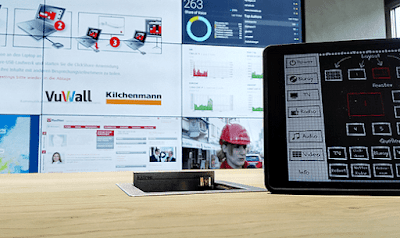
AV integrator, Kilchenmann, equipped Mobiliar’s newsroom with state-of-the-art audio visual technology that was required for them to serve as the central communication hub, at their headquarters in Bern, Switzerland. The 3×3 video wall at the heart of the room includes nine full HD 55 “displays (1080×1920 for a total of 9720×17280 pixels). The VuScape video wall processor and video wall management software by VuWall is used to route all sources to the displays, and be arranged in any layout desired, with perfect pixel accuracy. The sources managed by the VuWall system include web content as well as content from Barco’s ClickShare, a BluRay player, a Microsoft Wireless Display, TV signals and other conventional baseband cable connections.

Results

Today, the staff in Mobiliar’s newsroom are using their 3×3 video wall as both a collaboration space and as a valuable source of information to stay informed and up-to-date. The flexibility and versatility of the solution allows them to work efficiently and remain productive. VuWall’s solution delivers an easy and high quality visualization experience allowing employees to focus on their work and not worry about the technology.


About Mobiliar

Mobiliar, founded in Bern in 1826, is the oldest private insurance company in Switzerland. The company, which operates as a cooperative, employs more than 4,900 staff in Switzerland and Liechtenstein and offers 327 training places. One in every three Swiss households is insured through Mobiliar. The company specializes in proving vehicles, travel, health, and housing insurance.


About Kilchenmann (Integrator)

Kilchenmann is the leading provider of professional audio-video and communication technology in Switzerland, with locations in Bern, Basel and Zurich. Kilchenmann brings innovative media and communication solutions for large companies, SMEs and builders, with an end-to-end approach to customer consulting.


Unified Visualization and Video Wall Control across Campuses in Higher Education

Original Source:  https://vuwall.com/unified-visualization-in-higher-education/ Consolidating Visualization Management Across Higher Ed Camp...